
Overview
Abaqus 2026 FD01 focuses on faster simulation turnaround using GPU acceleration, broader Multiphysics setup in the GUI, and smoother day-to-day modeling work. The major areas of improvements are:
- GPU acceleration is now supported in Abaqus/Explicit on NVIDIA GPUs for Linux, across a wide range of dynamic and quasi-static structural simulations
- More GUI coverage for coupled thermal electrochemical workflows and related fields, loads, and boundary conditions (previously available in keywords editor only)
- Expanded contact and interaction setup options, including electrical and thermal contact property enhancements
- Usability improvements in Abaqus/CAE for geometry creation, visualization, and job execution
The blog below highlights these updates and much more across Abaqus’ key workflow steps:
Modeling and preprocessing
Documentation and model organization
The Abaqus 2026 FD01 release includes quality of life updates such as:
- PDF versions of Abaqus documentation guides are now available from each guide overview and are updated with each HTML documentation release (not just for GA releases)
- A node set can be generated directly from a previously defined surface, making surface-based selection more direct
Abaqus/CAE productivity and visualization
Geometry and datum tools
Model setup in the GUI is faster when common reference geometry can be created directly, without intermediate construction steps. To help in that, the below features are added:
- New datum point, axis, and coordinate system creation methods, including coordinate based points, axis plane intersections, cross product axes, projection axes, and rotated coordinate systems
- Improved AutoCAD DXF sketch import with support for polylines, splines, ellipses, and other complex entities
- Seam creation is supported on dependent part instances for fracture modeling workflows
Sections, profiles, and display options
Several updates target repetitive setup tasks and clearer interpretation of results.
- Channel and hat beam profiles can be defined directly in the Property module
- Continuum particle element plots support multiple render styles to better distinguish particle based regions
- Animations can be saved and loaded as MP4 or animated GIF for easier sharing and presentation
Multiphysics setup in the GUI
Coupled thermal electrochemical modeling is now more approachable since the key fields, loads, and constraints are available directly in Abaqus/CAE (not just through keywords editor).
- Predefined fields for fluid electric potential, solid electric potential, and ion concentration
- Boundary conditions for electric potential electrolyte and ion concentration
- Loads for distributed ion concentration body flux, ion concentration flux, and fluid surface current
- Tie constraints can include additional degrees of freedom such as temperature, pore pressure, and electrochemical degrees of freedom
- Uniform coupling type can be used to couple non displacement degrees of freedom
- GUI support for coupled thermal electrochemical procedures, including structural and structural pore pressure variants
Contact, thermal interactions, and step controls in the GUI
Contact and step definition now have a broader GUI coverage, especially for workflows that combine contact with thermal and electrochemical behavior.
- Surface film and surface radiation can be defined on evolving faces of elements
- Gap diffusivity contact property is supported in the GUI
- Gap electrical conductance contact options expanded, including solid and liquid electrolyte behavior and ion concentration dependent data for liquid electrolyte
- Gap heat generation contact options expanded, including multiple interaction fractions and weighting factors
- Step controls can be defined and modified in the GUI
- Follower parameter support for pre tension sections helps large displacement bolt load setups
- Contact mass scaling can be defined for Abaqus/Explicit simulations
Execution and scripting foundations
Platform and scripting updates help modernize execution workflows and automation.
- Job execution can use 3DEXPERIENCE® on cloud licensing when launching Abaqus/CAE from the Platform Connector
- Abaqus Python and Abaqus/CAE are based on Python 3.10. For more information about this major change, visit go.3ds.com/AbaqusPython
Analysis and performance
GPU acceleration and dynamics workflows
Performance improvements target time to solution, especially for large explicit models and dynamic workflows.
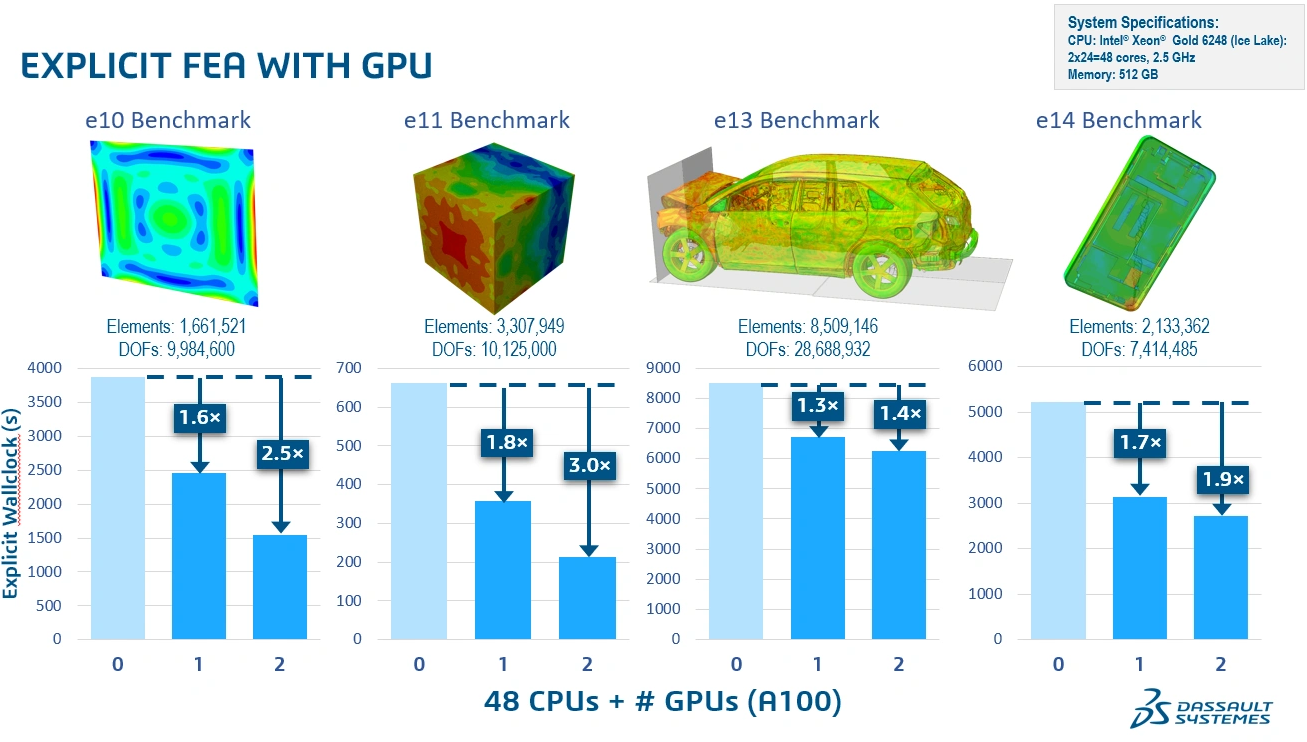
- Abaqus/Explicit supports execution on GPU devices and shows that performance gains are workflow dependent but can be significant for large models, especially models with hundreds of thousands up to multiple millions of elements
- Flexible execution options: run on a single node with one or more GPUs, or on a multi node cluster with multiple GPUs
- Fourier transform support in linear dynamics procedures enables time domain and frequency domain conversions within modal based workflows
- GPU execution supports most features, with exceptions including user subroutines, CEL, ALE, and particle methods
- The figure below shows example speedups across several Abaqus/Explicit benchmarks when adding 1 GPU and 2 GPUs, highlighting differences between element computation dominated and contact dominated workloads.
SPH liquid modeling updates
SPH performance and memory usage are improved for liquid modeling by changing how particle interactions are computed.
- New particle to particle pairwise interaction algorithm improves performance and reduces memory usage for SPH simulations in liquids
Co-simulation and field mapping scalability
Co-simulation mapping is improved to reduce idle time and make better use of available processors.
- Mapper neighborhood search and mapping during field transfer show significant speedup when more processors are engaged, reducing partner idle time during co simulation
Submodeling enhancements and behavior changes
General submodeling support expands, with one important behavioral change to keep in mind for cut surfaces.
- General submodeling supports beam-to-beam and solid-to-solid submodeling in addition to existing combinations, including additional degrees of freedom such as temperature and pore pressure
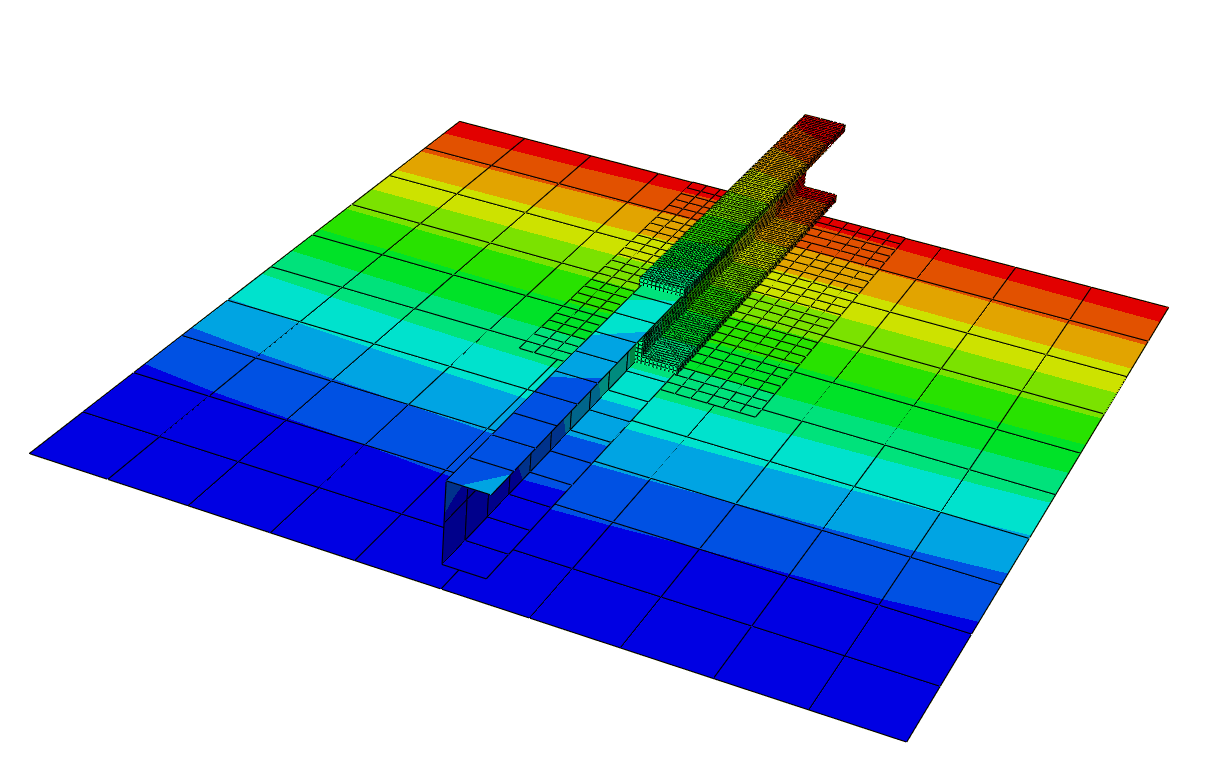
- Submodel cut surface definition is moved from history data to model data, and submodel conditions must be applied to all primary degrees of freedom on the cut surface
Fracture and fatigue
Abaqus/Standard expands fatigue crack growth capability with a more automated workflow.
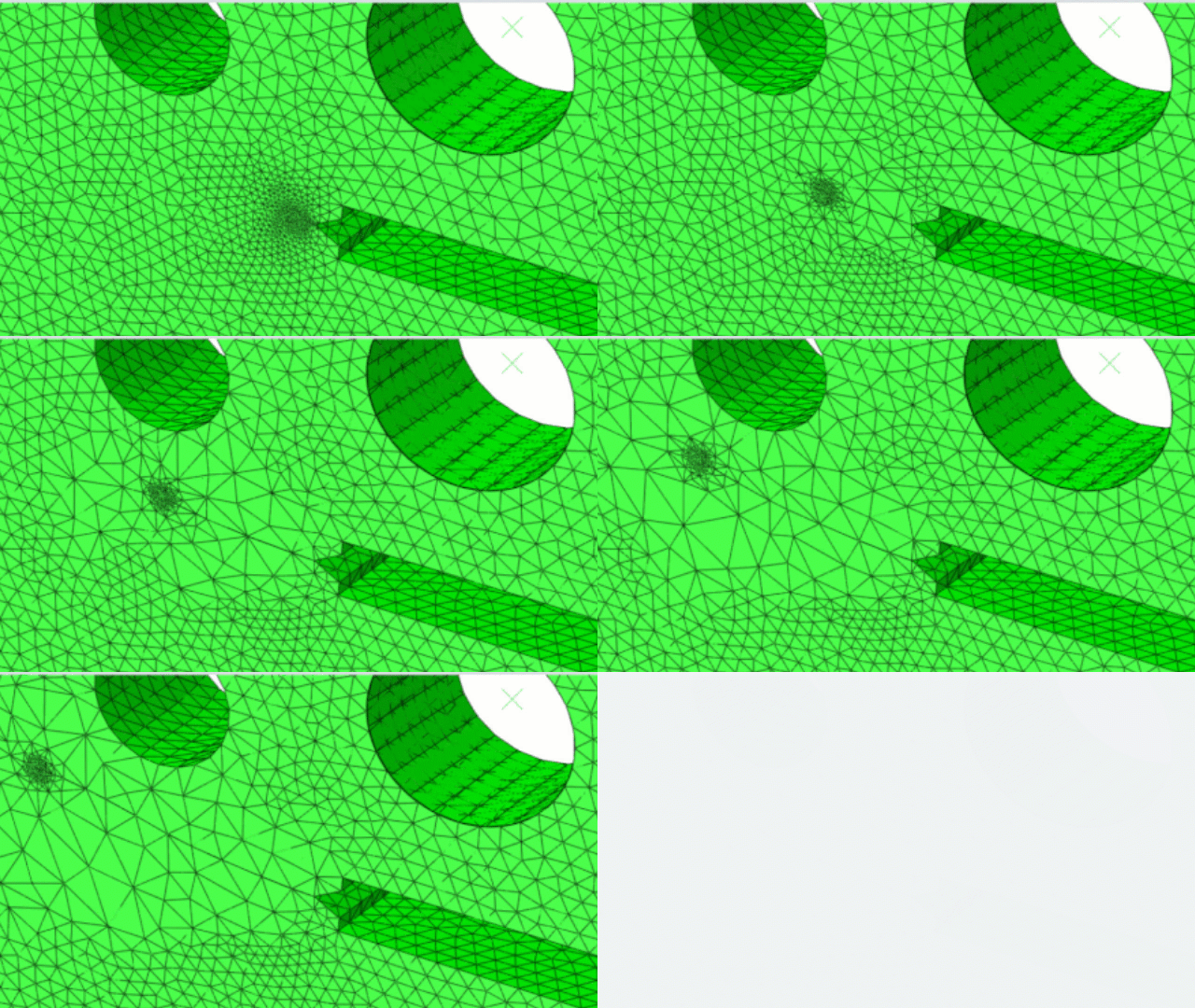
- Fatigue crack growth with adaptive remeshing is available in Abaqus/Standard for linear elastic crack growth under cyclic loading
Interactions and contact behavior
Wear modeling and contact usability improvements broaden contact driven workflows across Standard and Explicit.
- Wear modeling is supported in Abaqus/Standard and Abaqus/Explicit using Archard wear formulation, with nodal wear distance visualization
- In steady state transport analyses, surface wear properties can be specified directly and Abaqus/Standard computes wear rate and total wear distance output
- Reference thread geometry in Abaqus/Standard can be specified on either surface of a small sliding general contact interaction for better usability
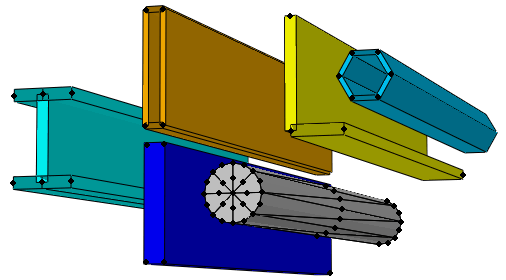
- Contact surface representation for beams and pipes is improved, including more realistic contact treatment for noncircular beam cross sections and configurable surface element generation for circular sections as seen in the figure below
Keywords and input file updates
Several keyword enhancements expand control, output targeting, and analysis setup. A few notable changes in Abaqus Keywords include:
- Contact controls assignment supports additional TYPE values including enforcement method, friction enforcement, permeability constraint method, and tracking thickness
- Controls option can adjust default contact and slip compatibility tolerances when using specific converge check settings
- Step cycling and step cycling control options add repeated step capability with early termination criteria
- Electrical conductivity coverage is extended to coupled thermal electrochemical families, and electrical resistivity is introduced for workflows such as piezoresistive materials
- Surface film transition parameter adds control of film coefficient dependence on contact status, and step control tolerance parameter adds clearer threshold triggering behavior
- Surface section can define constant thickness surface elements independent of rebar usage, and wear surface properties activates wear distance accumulation at contact nodes
- Node output can target a named surface using a new surface parameter
Materials updates
Abaqus expands its material modeling toolkit across fabrics and composites, rubberlike behavior, polymer creep and softening, damping, porous media, and coupled electromechanical effects.
Composites, fabrics, and orthotropic behavior
- Ply fabric material model is available in Abaqus/Standard for bidirectional fabric reinforced composites, using a multilayer homogenization approach and supporting inelastic behavior in the thickness direction. Result import is supported between Abaqus/Standard and Abaqus/Explicit.
- Paperboard material model is available in Abaqus/Standard and Abaqus/Explicit, aimed at highly orthotropic paperboard workflows including plasticity effects.
- Plane stress orthotropic failure measures add a new stress-based measure based on the Yamada Sun theory.
Damage and failure modeling
- Generalized damage initiation criteria are added for fully anisotropic materials, with stress based and strain-based criteria available broadly across material types and stress displacement elements.
- Multiscale damage and failure for fiber reinforced composites adds new micro level failure criteria based on stress invariants and supports damage evolution, with support extended to 3D elements.
Hyperelastic and rubberlike behavior
- Hencky hyperelastic model is available to define elastic response for moderately large deformations, and can serve as a finite strain alternative to isotropic linear elasticity in cyclic loading cases.
- Hencky hyperelastic behavior is now supported in Abaqus/Explicit, including results transfer between Abaqus/Standard and Abaqus/Explicit.
Parallel rheological framework: creep and softening
- Viscous softening is supported for nonlinear viscoelastic networks in the parallel rheological framework in Abaqus Standard and Abaqus Explicit.
- Anand creep model is now available in the parallel rheological framework in Abaqus Standard and Abaqus Explicit.
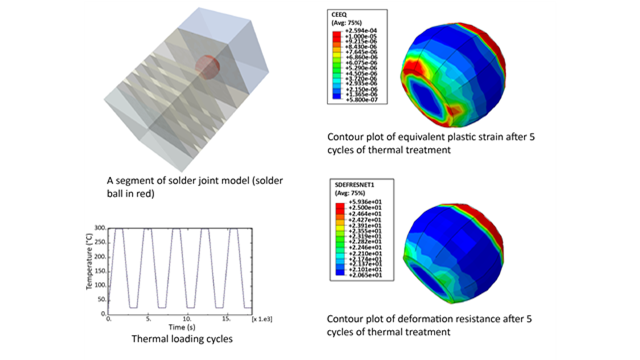
- Darveaux viscous behavior can be used in the parallel rheological framework to capture both primary and secondary creep.
- Modified Darveaux viscous behavior improves robustness when a step includes idle time or periods of zero loading.
Cure and process driven behavior
- Ductile damage initiation criteria can now be computed for hyperelastic materials with isotropic plasticity, supporting efficient preload in Abaqus/Standard before continuing degradation in Abaqus/Explicit.
- Kamal cure model coefficients can now depend on temperature and field variables, expanding cure modeling workflows where external drivers such as ultraviolet radiation influence curing.
Porous media and damping
- Field expansion can now be defined independently for solid grains and pore fluid in porous media, and pore fluid expansion and strain outputs are supported.
- Frequency dependent structural damping is supported in Abaqus/Standard, and damping definitions can depend on field variables across alpha, beta, band limited, and structural damping.
- Band limited damping adds an option to keep damping ratio approximately constant within a specified frequency band for implicit dynamics.
Electro mechanical coupling
- Piezoresistive effect can be modeled in Abaqus/Standard for materials whose electrical resistivity changes with stress.
- Electrical resistivity can now be defined directly in Abaqus/Standard, which also supports piezoresistive workflows.
Conclusion
Abaqus 2026 FD01 includes GUI coverage expansions with solver and workflow improvements that can reduce setup time and improve turnaround for large and multiphysics models. Teams working in battery style electrochemical workflows, contact heavy simulations, and dynamic analysis pipelines should find several major upgrades that simplify setup and improve throughput. Additionally, for teams using large Explicit models, GPU acceleration can deliver a substantial speedup in this release, with the biggest gains typically appearing in large element computation heavy cases. Finally, you can scale from a single node to multi node GPU clusters, making this a very scalable path for both workstation and HPC deployments. More updates are coming months, so follow us and stay tuned!
Try Abaqus 2026 FD01
If you’d like to see these new capabilities in action and explore how it fits your projects, contact us to try Abaqus 2026 FD01.
Reference
Dassault Systemes SIMULIA, Abaqus Release Notes 2026 available in https://help.3ds.com/2026/English/DSSIMULIA_Established/SIMACAERNGRefMap/simarng-c-ov.htm?contextscope=all&id=6e91a971082348ceb61b0c2d13a7796f