

Logo
    Updating the license key using FlexNET License Server

    Updating the license key using FlexNET License Server

    July 22, 2025
    Mohammed Zourob
    5 min read

    Follow the following procedures to update the key license

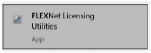
    Go to ‘Start’ and type the keyword 'FlexNET'. The following application, shown below must be selected to open the FlexNET License Server.
    Image

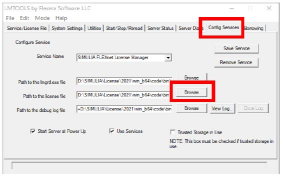
    On the LMTools GUI, go to the ‘Config Services’ tab and click ‘Browse’ next to the 'Path to the license file', then source and open the new license file.
    Image

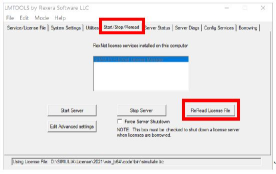
    On the ‘Start/Stop/Reread’ tab, click the ‘ReRead License File’. The license server will now recognize the new license key.
    Image

    Author

    M

    Mohammed Zourob

    Solutions Consultant - EMAG

    Mohammed holds a Bachelor's in Electrical Engineering and an MBA. His expertise lies in power and renewable energy, electromagnetic simulations, and product life cycle management

    Share: