

In some cases, users face some issues when installing CATIA V5, the user would get an error, so in this case a particular error that occurs in the installation process of CATIA V5 will be addressed.
What is CATIA V5
CATIA V5 is a powerful computer-aided design (CAD) software widely used in the engineering and manufacturing industries. Developed by Dassault Systèmes, it provides a comprehensive suite of tools for designing, analyzing, and simulating products in three-dimensional space. With its user-friendly interface and extensive functionality, CATIA V5 enables engineers and designers to create complex models, assemblies, and drawings with precision and efficiency. It supports a range of disciplines, including mechanical, electrical, and aerospace engineering, making it a versatile solution for various industries. From conceptualization to production, CATIA V5 empowers users to streamline their design processes and bring innovative ideas to life.
CATIA V5 Prerequisites
The following are the software requirements that need to be present before initiating the installing process for successful installation:
- Microsoft Windows 64-bit
- 64-bit Windows 11 Desktop Enterprise Edition/Pro Edition
- 64-bit Windows 10 Desktop Enterprise Edition/Pro Edition
- IBM AIX
- AIX 7.2
- Microsoft Visual C++ Redistributable latest supported downloads
Error Message
The error message that will be addressed in this blog is presented below:
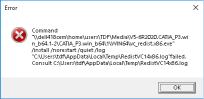
Error message:
“Command "\\XXXX \CATIA_P3.win_b64\1\WIN64\vc_redist.x86.exe" /install /norestart /quiet /log
"C:\Users\XXXX\AppData\Local\Temp\RedistVC14x86.log"failed. Consult
C:\Users\XXXX\AppData\Local\Temp\RedistVC14x86.log
This error occurs when installing CATIA V5 after downloading the installation media from the Software.3ds.com page. In particular, the files illustrated below "V5-6R2023.CATIA_PX.win_b64.1-2.zip" and "V5-6R2023.CATIA_PX.win_b64.2-2.zip".
Why does this Error happen
The reason behind this error essential goes to incorrect extraction behavior, which in some cases results two files upon extraction as seen below:

Hence, to avoid this behavior the installation media should be extracted in the following manner:
- First, it is highly recommened to use the third-party extraction application "7-Zip" which could be downloaded here.
- When extracting the files, the user should highligh both files, right-click, then go to "7-Zip" and choose "Extract Here".
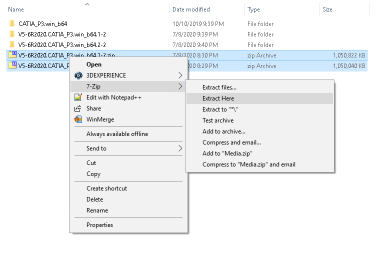
- When done in this manner the user will get a single folder named "V5-6R2023.CATIA_PX".
- In this case, proceeding with the installation should be successful.
Conclusion
It should be noted that the process described above is applicable to all Software provided from Dassault Systèmes. By applying this method, the files are extracted in correct manner, which eliminates the cause of errors in the installation media. A similar error would be faced, if an incorrect method of extraction was used in any of the software.
Author

Besma Benzamia
Senior Solution Consultant
Besma is a chemical engineering graduate with a focus on separation processes, materials, and chemical reactions. She is currently working as a senior solutions consultant, focusing on molecular modeling and simulation using Materials Studio and COSMOsuite.