

Client Configuration
Go to 'SIMULIAEstProducts2022win_b64SMAsite' and open the input file 'EstablishedProductConfig.ini'.
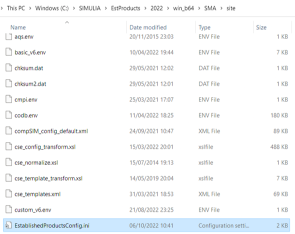
Depending on the type of license you need the client to point:
If the client needs to point to DSLS. fill the following, 'LICENSE_SERVER_TYPE=dsls' and 'DSLS_LICENSE_CONFIG=C:ProgramDataDassaultSystemesLicensesDSLicSrv.txt'

If the client needs to point to FlexNET, fill the following, 'LICENSE_SERVER_TYPE=flex” and “FLEX_LICENSE_CONFIG=@''

> Note: FlexNET port numbers need to be assigned values between “27000-27010”. Other numbers will not work. Leave the port number blank if you wish for FlexNET to automatically set the port numbers.
> Note: For those switching to a FlexNET license, after finishing 2b, the process is complete, and you can check if the client has successfully pointed to the license server by opening Abaqus CAE. For those switching to a DSLS, proceed to 3.
For clients pointing to DSLS
Go to 'C:ProgramDataDassaultSystemesLicenses' and open 'DSLicSrv.txt'

Fill the following ':4085'

Save the file “DSLicSrv.txt”. Check if the client points to the license server correctly by opening Abaqus CAE.
> Note: Unlike FlexNET, DSLS has one static port number (4085) and should be used regardless the number of applications that uses the port number.