DELMIA · Industrial Engineering
Process Engineering
Transform the engineering definition of a product into the MBOM, the process plans and the work instructions the shop floor reads, and validate the build-up in 3D.
Download the DELMIA Process Engineering datasheetsOne plan
Design, validate & document your processes
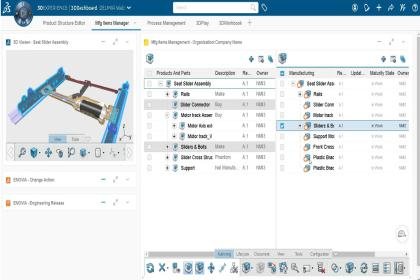
The MBOM, built from the engineering bill of materials
The initial MBOM is generated automatically from the EBOM, then defined, compared and updated against it. Make or buy parts, manufacturing assemblies and kits are added where manufacturing needs them.
When the design changes
Digital continuity from engineering to manufacturing
Every manufacturing item and every operation holds a link to the part of the product it refers to. A design engineering change is propagated through the associated MBOMs and process plans, with integrated engineering change management and impact analysis.
- 01Engineering changesThe change reaches the MBOM, the process plans and the work instructions built on it.
- 02VariantsMultiple variants are planned efficiently in the same line or in different lines.
- 03PlantsA plant-specific MBOM is defined from a central one, so each production site produces the product its own way.
On the shop floor
3D work instructions
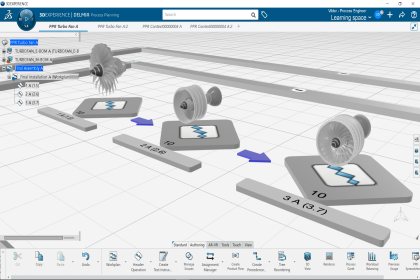
Each operation is detailed with work instructions that include text, alerts, sign offs, data collects and 2D or 3D views, generated from the assembly plan. Released for execution, they reach the operator in DELMIA Apriso as electronic and 3D work instructions that always show the current version of the process and the product design.
- 01Built on the 3D modelDesign 3D data, xCAD included, is reused to create the instructions.
- 02A shorter learning curveWorkers learn a complex assembly from 3D work instructions and build it right the first time.
- 03Configured for variantsConfigured work instructions support product and process variants, and best practices are stored in a catalog for other authors.
What you buy
Licensed by roles
A role gives one user the apps for their job. 22 roles cover process engineering on the 3DEXPERIENCE platform.
What would you like to define in DELMIA?
How will your team work?
MBOM, routings & operations
Work instructions
Process simulation
Industry specific
22 roles cover process engineering.
Frequently Asked Questions
We already have an engineering BOM. Why keep a manufacturing BOM as well?
The two answer different questions. The engineering BOM is how the product was designed, and the manufacturing BOM is what has to be made, bought and assembled, plant by plant. On the platform they are separate structures with links between them, so the MBOM regroups parts into manufacturing assemblies and kits of its own while every item still traces back to the design. The MBOM is also the deliverable that ERP and execution receive.
Our planning lives in Excel and the ERP. What changes?
The plan is built on the 3D product. Dassault Systèmes name the usual alternative as manual entries in the ERP system, Excel files or internal development, and each of those is updated by hand when the design changes. On the platform the change reaches the MBOM, the process plans and the work instructions built on it. The ERP still receives the MBOM and the routings, released from the platform.
Do we need CATIA for the design data?
Any CAD system will do. Dassault Systèmes state that the DELMIA solutions work with any kind of CAD as input, using converters, xCAD or POWER’BY. Reusing design xCAD 3D data to create work instructions is among the differentiators they list for Process Engineering. Tell us the CAD system and we confirm the route before the quote.
What happens to the process plan when the design changes?
The change is carried to everything built on it. Dassault Systèmes describe Process Engineering as the tool to handle frequent product changes thanks to digital continuity: design engineering changes are propagated through the associated MBOMs and process plans, with integrated engineering change management and impact analysis. Underneath, every manufacturing item and every operation holds a link to the part of the product it refers to, which is how the platform knows what a change touches.
How does the plan reach ERP and the shop floor?
It is released from the platform. The MBOM goes to ERP, or any other external system, for procurement and supplier exchanges. Process plans go to scheduling and execution, and work instructions go to the shop floor. Where the execution system is DELMIA Apriso, the operator follows electronic and 3D work instructions that always show the current version of the process and the product design. Tell us the systems you run and we raise the hand-over on the call.
How do I know which roles we need?
By what you hand over. The roles are arranged by deliverable: the MBOM with its routings and operations, work instructions, and process simulation, with the roles Dassault Systèmes package for one industry beside them. The same work is then offered in a web browser, or in 3D applications at an entry level and an advanced level, and each of those is a role. The quote guide works it out from your answers and shows you why.
Resources
Articles, events and downloads from across the Dassault Systèmes portfolio.
Training on DELMIA Process Engineering
Official Dassault Systèmes courses, taught by certified instructors in person, at your offices or online.